How to Use the Blueair Blue Pure 511i Max: Complete User Guide
The Blueair Blue Pure 511i Max has two control buttons for automatic operation, three manual speeds, Night mode, display brightness, Child Lock, Wi-Fi pairing, and resets. Its PM2.5 sensor shows the condition of the room air and supports automatic fan adjustment.
This guide covers setup, daily use, app pairing, and maintenance for model 3132111100. Its button timings, filter instructions, and connection requirements come from the product manual.
Before You Turn On the Blueair Blue Pure 511i Max
Place the purifier indoors on a stable surface. Keep the fabric-covered air inlet and top outlet clear, and do not place objects on or against the unit. Keep the purifier, plug, and cable away from water, heat, open flames, and chemicals. Do not use it in wet locations such as bathrooms, laundry rooms, or pool areas.
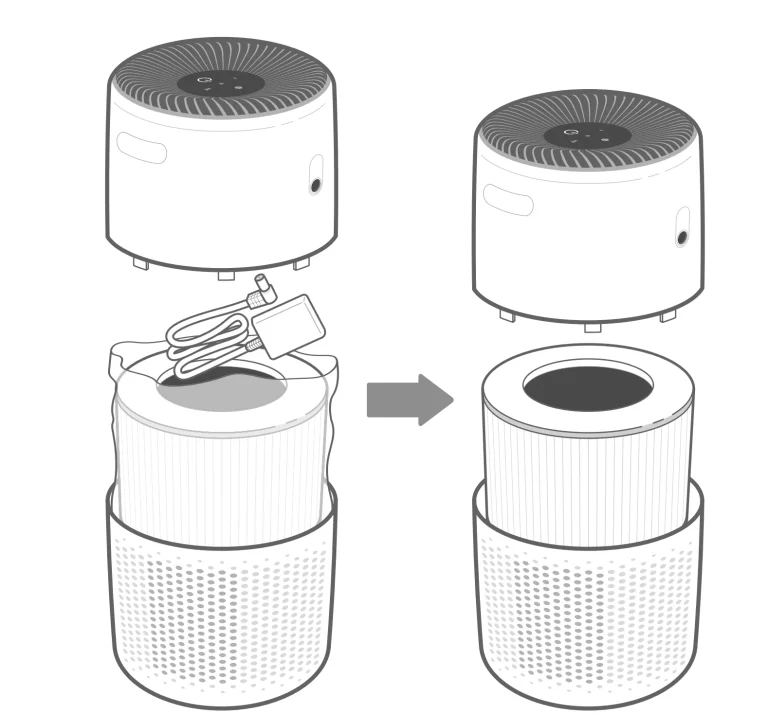
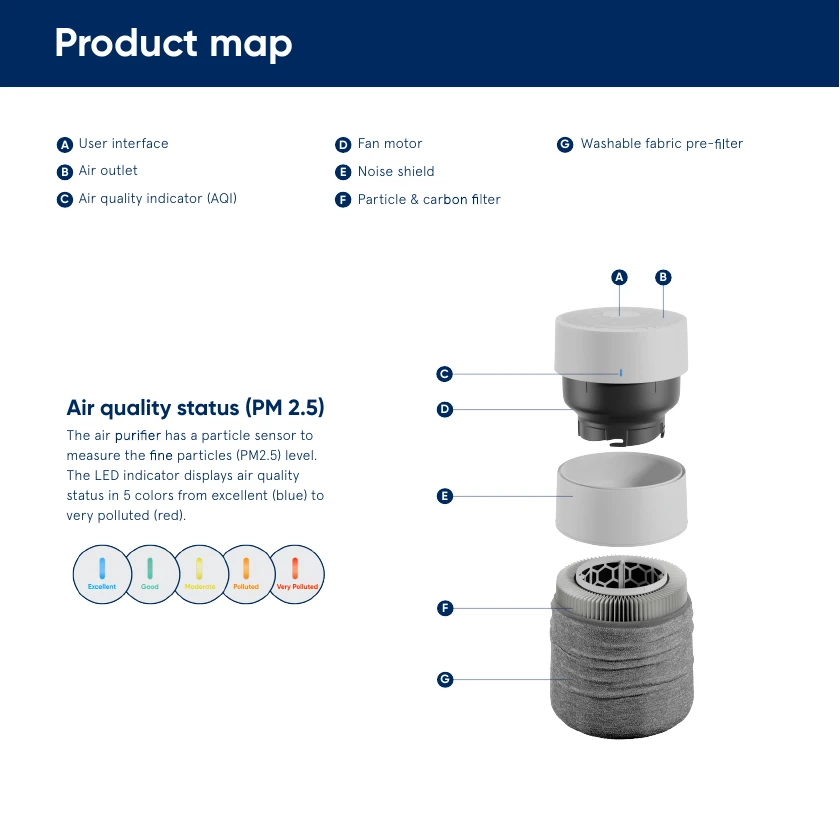
Remove any shipping plastic from the main particle and carbon filter; plastic can restrict airflow and cause unusual noise. Reassemble the unit with the noise shield above the main filter and the washable pre-filter outside, with its leather tag at the top.
Use the supplied cable and plug it directly into an appropriate wall outlet. Do not use an extension cord or power strip or modify the plug. If the cable, plug, or appliance is damaged, unplug it and contact Blueair instead of attempting an electrical repair.
How to Use the Blueair Blue Pure 511i Max
- Plug the purifier directly into the wall outlet.
- Press the On/Standby button to turn it on.
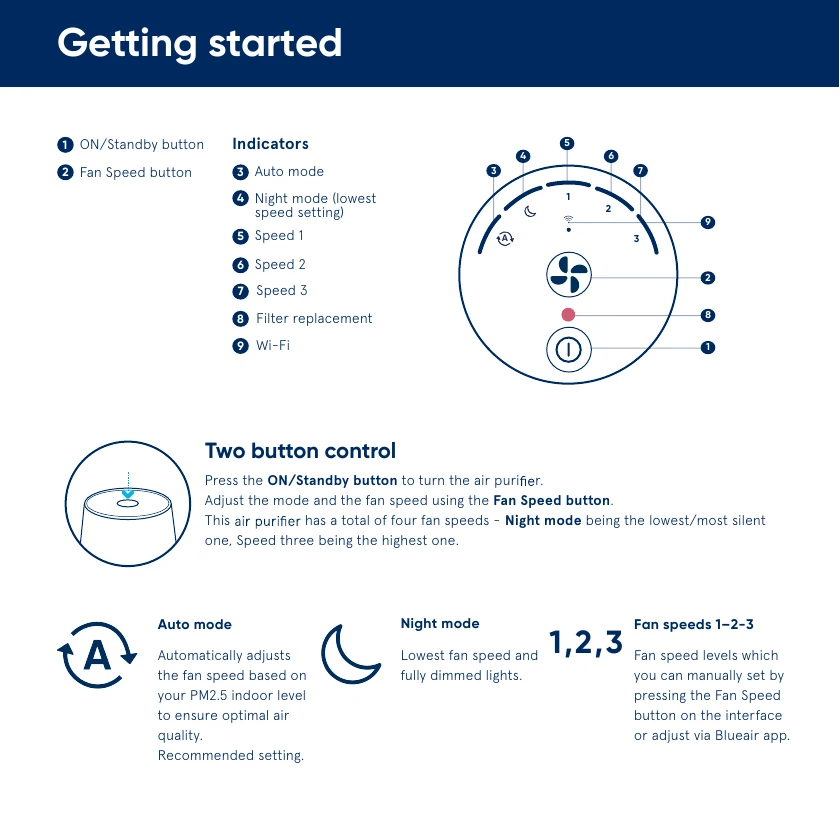
- Press the Fan Speed button to choose Auto, Night, Speed 1, Speed 2, or Speed 3.
- For normal daily use, select Auto mode. Blueair identifies this as the recommended setting because it changes the fan speed according to the PM2.5 level detected in the room.
- Leave space around the air inlet and outlet and allow the purifier to run as needed. Use the air-quality light to follow changes in particle levels.
- Press On/Standby when you want to place the purifier in standby.
Wi-Fi is not required for basic air cleaning. The physical buttons operate the purifier and select every fan setting. The optional Blueair app adds remote control, filter-use monitoring, and other functions.
Choosing the Right Fan Mode
| Mode | What it does | Best use |
|---|---|---|
| Auto | Automatically changes fan speed in response to the measured indoor PM2.5 level. | Recommended for everyday, hands-off operation. |
| Night | Runs at the lowest, quietest fan speed and fully dims the lights. | Sleeping or other times when low noise and darkness matter. |
| Speed 1 | Provides low manual airflow. | Quiet continuous use when you do not want automatic changes. |
| Speed 2 | Provides medium manual airflow. | A balance between airflow and sound. |
| Speed 3 | Runs the fan at its highest setting. | When you want maximum manual airflow and can accept more fan noise. |
How to Read the Air-Quality Indicator
The purifier’s particle sensor measures fine particles identified as PM2.5. The air-quality indicator uses five colors: blue for excellent, green for good, yellow for moderate, orange for polluted, and red for very polluted. A changing color is not automatically a fault. It reflects the particle level detected near the sensor.
If the reading does not improve, unplug the purifier, wait about 30 seconds, and check the rear sensor area for objects or dust. Reconnect power and press the power button. If the purifier and ventilation still do not improve air quality, contact Blueair.
Brightness, Child Lock, and Reset Controls
Change the display brightness
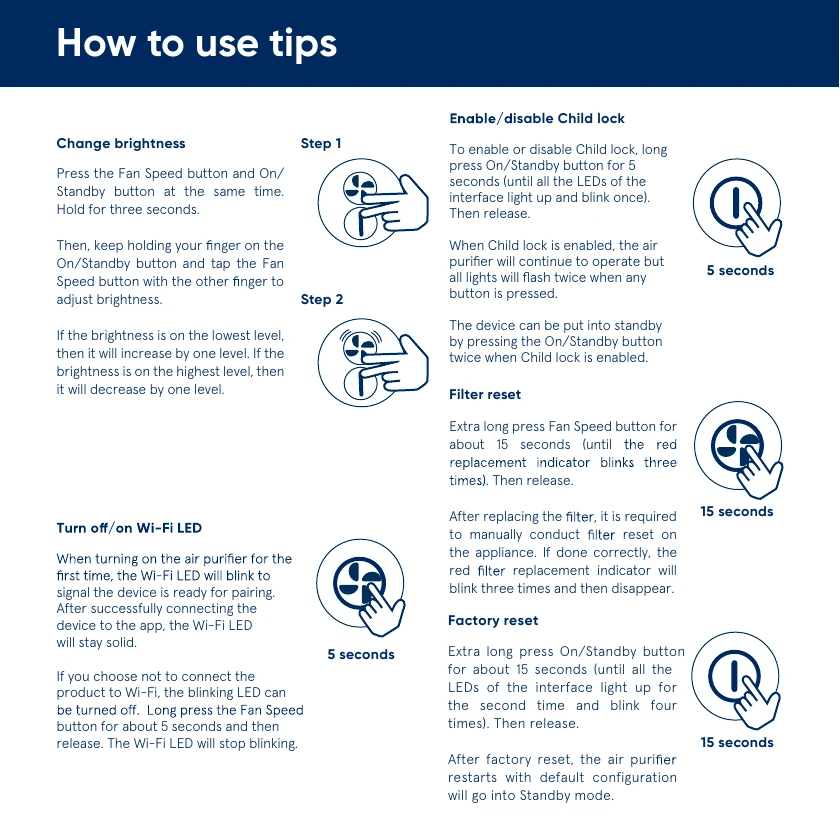
Press the Fan Speed and On/Standby buttons together for three seconds. Keep holding On/Standby, then tap Fan Speed with your other finger to adjust the brightness. When the display is at its lowest level, the next adjustment increases it by one level; when it is at the highest level, the next adjustment decreases it by one level. Night mode is the quickest choice when you want the lowest fan speed and fully dimmed lights together.
Enable or disable Child Lock
Hold the On/Standby button for five seconds, until all interface LEDs light and blink once, then release it. With Child Lock enabled, the purifier continues running, but all lights flash twice if a button is pressed. You can still put the unit into standby by pressing On/Standby twice. Repeat the five-second hold to disable the lock.
Use a factory reset only when needed
Hold On/Standby for about 15 seconds. Wait until all interface LEDs light for the second time and blink four times, then release the button. The purifier restarts with its default configuration and enters standby. This is different from the filter reset described below and should not be used merely to clear the red filter indicator.
How to Connect the Blue Pure 511i Max to the Blueair App
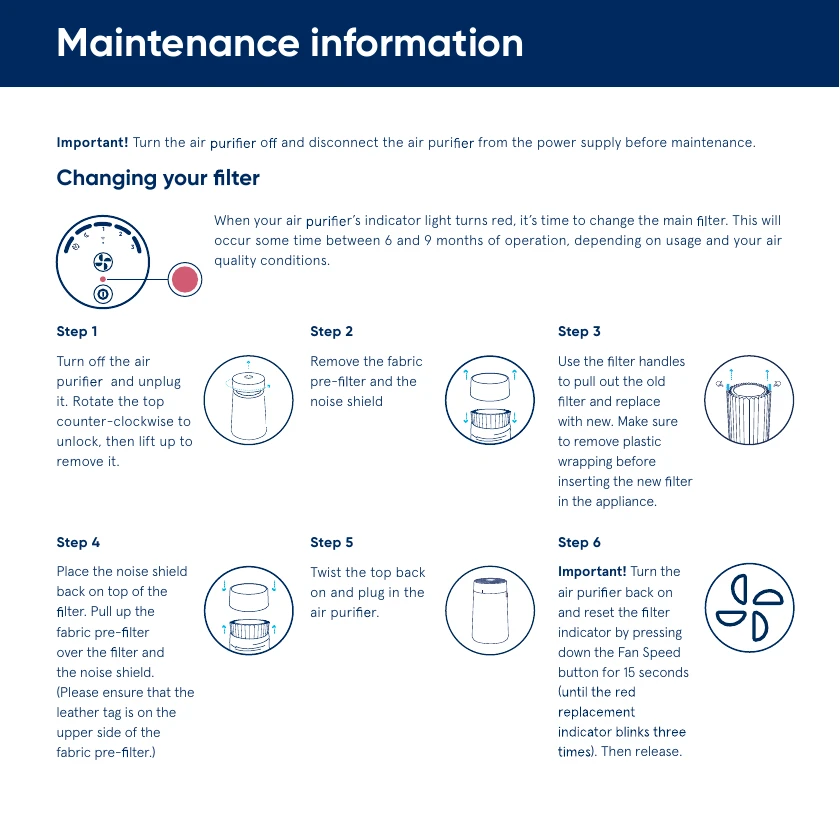
Download the Blueair app, create or sign in to your account, tap Connect Product, select Blue, and follow the pairing instructions.
For the first connection, turn on the purifier and confirm that its Wi-Fi indicator is blinking. Enable Bluetooth on your phone and keep the phone within 3 feet of the purifier. Use a visible 2.4 GHz Wi-Fi network, not a hidden network; if your router combines 2.4 and 5 GHz bands, select 2.4 GHz for pairing. Disable any VPN during setup. The manual also recommends keeping the purifier within 15 feet of the router for an optimal connection. When pairing succeeds, the Wi-Fi LED stays solid.
If you do not want to connect the purifier, hold the Fan Speed button for about five seconds and release it to stop the Wi-Fi LED from blinking. If a previously connected purifier loses its connection and does not reconnect after a few minutes, open the app, select the purifier, go to Product Settings, delete it, return to the home screen, and use Connect Product to pair it again.
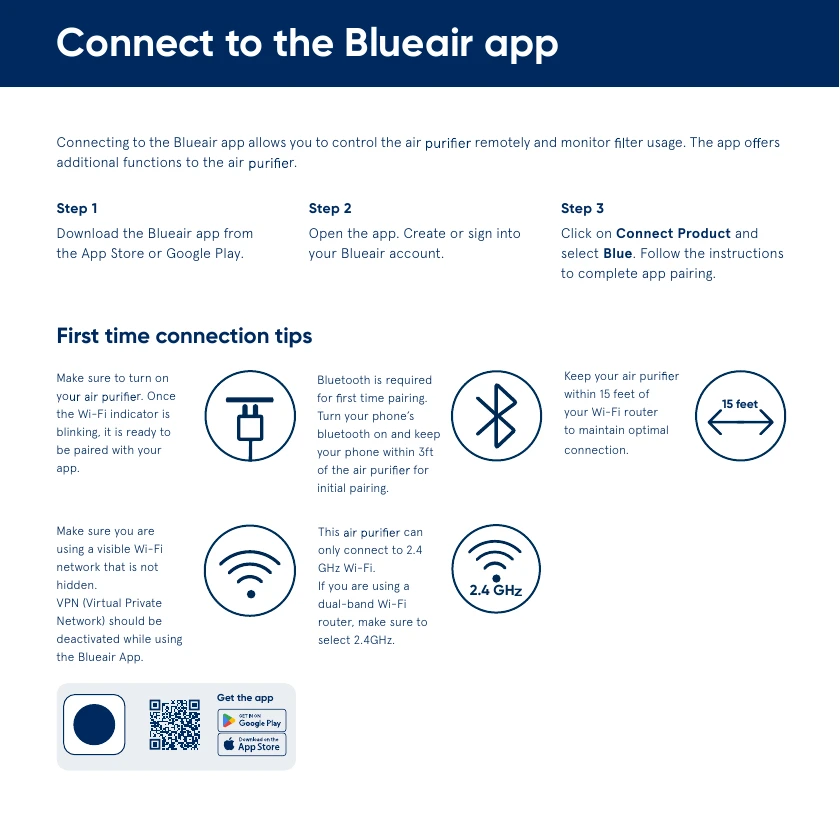
Cleaning the Washable Fabric Pre-Filter
Turn off and unplug the purifier before any maintenance. Clean the fabric pre-filter whenever you can see dust or dirt. For routine cleaning, vacuum the outside of the fabric with a soft brush attachment. If it needs deeper cleaning, remove it and wash it according to the instructions printed on its label, then hang it to dry.
- Rotate the top counterclockwise to unlock it, then lift it off.
- Remove the fabric pre-filter from the noise shield and main filter.
- Clean the fabric as directed on its care label and let it dry.
- Pull the clean pre-filter back over the main filter and noise shield.
- Position the leather tag at the upper part of the pre-filter.
- Push the top cylinder down and rotate it clockwise to lock it.
Do not use gasoline, chemical solvents, or corrosive cleaning materials. The main particle and carbon filter follows a replacement procedure; the manual does not instruct users to wash it.
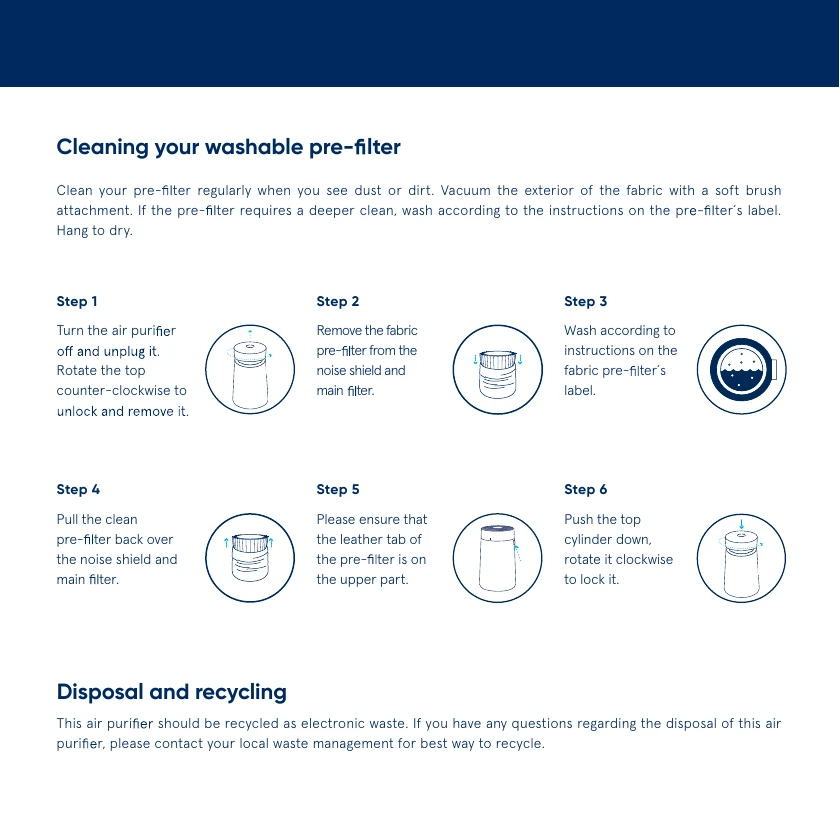
Replacing the Main Filter and Resetting the Red Light
The red filter-replacement indicator normally appears after about 6 to 9 months of operation, depending on use and air-quality conditions. If the warning light appears, don’t panic. In many cases, it is a safety or maintenance reminder rather than a sign that the appliance is completely broken.
Switch off and unplug the purifier. Rotate the top counterclockwise, lift it off, and remove the fabric pre-filter and noise shield. Use the filter handles to lift out the old main filter. Remove all plastic wrapping from the replacement filter before inserting it. Reinstall the noise shield, pull the fabric pre-filter over the assembly with its leather tag at the top, lock the top clockwise, and reconnect power.
Turn the purifier on, then hold the Fan Speed button for about 15 seconds. Release it after the red replacement indicator blinks three times. The red light should disappear. This manual filter reset is necessary after replacement; replacing the filter alone does not clear the timer.
Quick Troubleshooting
- Red circle on the panel: replace the main filter, then hold Fan Speed for 15 seconds until the red light disappears.
- Too much noise: choose a lower speed, remove any plastic sealing from the main filter, vacuum the pre-filter, and replace the main filter when its indicator is red.
- Cannot connect: keep the phone, purifier, and router close during setup; update the Blueair app; verify internet access and 2.4 GHz Wi-Fi; disable VPN; and enable Bluetooth.
- Buttons appear unresponsive: Child Lock may be active. If all lights flash twice when you press a button, hold On/Standby for five seconds to disable the lock.
- Damaged or malfunctioning unit: turn it off, unplug it, and contact Blueair. Do not open or service internal electrical parts yourself.
Frequently Asked Questions
What is the best setting for the Blueair Blue Pure 511i Max?
Auto mode is the manual’s recommended setting. It adjusts fan speed in response to the indoor PM2.5 level.
Can I use the Blue Pure 511i Max without the app?
Yes. The On/Standby and Fan Speed buttons provide basic operation and access to Auto, Night, and manual Speeds 1-3.
What does Night mode do?
Night mode uses the lowest and quietest fan speed and fully dims the purifier’s lights.
Why is the air-quality light red?
The air-quality indicator uses red for a very polluted PM2.5 reading. Check the room source and make sure the sensor area is clear and clean.
Why is there a red circle on the control panel?
A red filter-replacement circle means it is time to replace the main filter. After replacement, hold Fan Speed for about 15 seconds to reset it.
How often should I change the Blue Pure 511i Max filter?
The indicator generally turns red after 6 to 9 months of operation, depending on use and air quality.
Can I wash the Blue Pure 511i Max filter?
The fabric pre-filter is washable according to its care label. The main particle and carbon filter should be replaced, not washed.
Does the purifier connect to 5 GHz Wi-Fi?
No. The manual states that the purifier connects to 2.4 GHz Wi-Fi. Bluetooth is also required for first-time pairing.
How do I factory-reset the Blue Pure 511i Max?
Hold On/Standby for about 15 seconds, until the interface LEDs light for the second time and blink four times, then release. The purifier returns to its default configuration and enters standby.
Final Tips
For the simplest routine, keep the purifier in Auto mode, check that its inlet and outlet remain clear, and vacuum visible dust from the pre-filter. Use Night mode when you want the quietest setting and darkened controls. Treat the red circle as a filter-maintenance reminder, not as an air-quality reading, and always unplug the unit before cleaning or replacing a filter. These habits cover nearly everything needed to use the Blueair Blue Pure 511i Max safely and effectively.